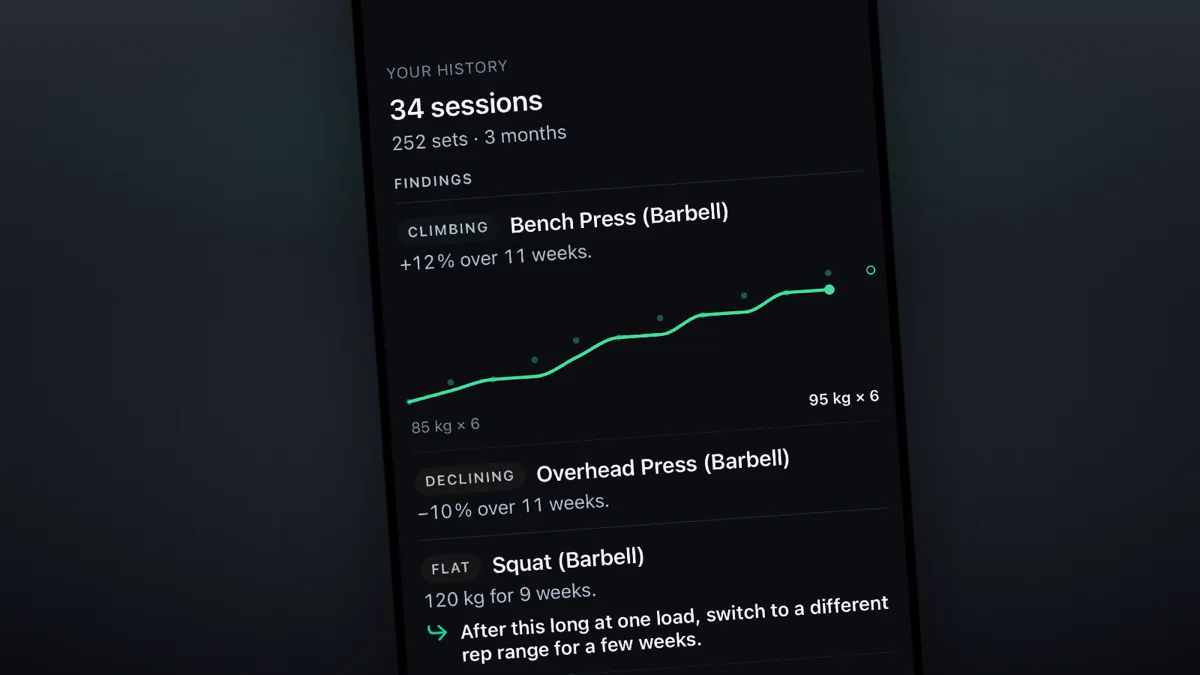
Povver imports your history from popular trackers like Hevy, Strong or Fitbod, so changing apps does not mean starting over. Export your log as a CSV and pick it during setup. Before your first workout, Povver shows what your main lifts have been doing and builds your first programme from the training you already do.
Can I import my workouts from a tracker like Hevy, Strong or Fitbod, and what do I get?
Yes. You get a read on your last 12 weeks before you have logged a single set in Povver: a verdict on each of your main lifts (up to eight) and your best recent set on each.

Here the bench press is climbing, up 12% over 11 weeks. The overhead press is declining, down 10% over the same stretch. The squat has sat at 120 kg / 265 lb for 9 weeks, so Povver suggests a different rep range for a few weeks.
When your log is too thin to show a direction, the lift just says "No clear trend" or "Not enough data". Every readout also carries one suggestion, such as a deload or a change of rep range. The rest of your history keeps loading in the background, newest first.
What will my first week look like?
Your first programme comes from your history. If you have trained a steady split lately, Povver keeps your days, your order and your workout names, and fills each day with the exercises you repeat. If your training has been all over the place, it starts from a standard plan and slots your own lifts into it.
Starting weights come from your sets too. Povver works out what you could lift for the reps your programme asks for, rounds down to a weight that fits your plates, and never goes above the heaviest weight you have lifted on at least two sets. After a break the loads come down. After more than 12 weeks away, Povver leaves the weights blank and you set them in your first sessions.
Here the week has three days: pull, legs and push. Day 1 is a barbell bent over row and a cable lat pulldown, 3 sets each, about 18 minutes.

How do I export from my tracker and import into Povver?
- Export from your current app. The steps for Hevy, Strong and Fitbod are in Import your history. Povver reads CSV files up to 20 MB.
- In Povver, pick the CSV during setup, right after the equipment question. Skipped it? You can import later from Profile, Imported history.
- Check the matches. Povver lines your exercise names up with its catalogue. For a name it cannot place, you pick a close match, search, create it as your own exercise, or leave it out.

- Read the readout and your programme, then start the 14-day trial.
All of that happens before the trial starts. After it, Povver costs €9.99/month or €79.99/year. Prices vary by region.
What happens if I import twice, or keep logging in my old app?
Nothing doubles. Import a newer export later and the sessions that changed are updated, while the ones Povver already has are skipped. A workout you also logged in Povver, starting within 10 minutes of the imported one and with the same number of sets, shows up once.
What comes across from my old app?
Your workouts: every set with its weight, reps, distance or duration, plus the date and the workout's name. Warm-ups, drop sets and failure sets keep their type, and your notes come along. If you logged RPE, Povver turns it into RIR (10 minus RPE, rounded, with an RPE under 5 leaving RIR empty), and if you did not, RIR stays empty. Hevy's and Strong's exports both carry an RPE column. Weights are read in the unit the file uses and converted once. If the file does not say, you pick kg or lb on the preview.
Timed and distance sets are logged, and they earn no volume yet.
Routines, templates, body measurements, photos and rest times stay behind. Any exercise you leave out of the import stays out of your history, unless you create it as your own.
What does Povver do with my imported workouts afterwards?
Povver treats an imported session like one you logged yourself. When it moves a weight, it shows you why. The rules are in When should the weight go up?.
When your trial starts, Povver also replays up to 26 weeks of your history as weekly numbers and writes weekly reviews for the last 4.
Can I undo it, and where does my file go?
Go to Profile, Imported history and remove the source. Every workout it brought in goes, along with its volume and strength numbers and the uploaded file. Workouts you logged in Povver stay.
Povver keeps the uploaded file for up to 90 days so the importer can be improved against real files, and deletes it when you remove the import.
For Hevy, Strong and Fitbod files, Povver already knows the column layout, so no model works out which column is which. A model still helps match exercise names Povver cannot place itself, and it words the readout sentences. For any other layout, a model reads the header and 50 sample rows, with the notes columns removed, to work out the columns.
What can Povver not do yet?
Povver cannot export your history yet, and it has no Apple Watch app or social feed. It does not build cardio plans, though you can log timed and distance sets.
How does Povver work out the readout and the starting weights?
The numbers behind the readout and the first week.
The readout
- It reads your newest 12 weeks, counted back from the newest workout in the file.
- It covers up to 8 main lifts. The best recent set comes from your latest 3 training weeks. The typical set is the top set of your median week.
- Climbing or declining needs at least 6 weeks of training spread over at least 6 weeks, with at least 2 of them in the first third and 2 in the last third, and the later weeks consistently higher or lower than the earlier ones by 5% or more. A change under 5%, with no clear difference between early and late weeks, reads maintaining.
- Sets of 10 reps or fewer set a lift's level, because 1RM estimates drift past about 10 reps. A session with only 11 to 15 rep sets still counts, with lower confidence.
- A jump like 20 kg / 44 lb to 95 kg / 209 lb in one week is treated as a typo and left out.
- The suggestion comes from a fixed list: deload, hold the load and add a rep, restore frequency, microload or add a rep, change the rep range, double progression, keep going while your reps climb, or keep going. A deload appears when your RIR falls at a flat load, or when several lifts decline while their volume went up. After a long break there is no suggestion. The server picks the item from your sets, and the model only words the sentence.
Starting weights, for each lift the readout covers where you repeated a weight recently:
- Take the median estimated 1RM of each of your last 3 weeks, from sets of 1 to 12 reps, leaving out drop sets. The newest of those weeks has to be within your last 4.
- Take the median of those three numbers.
- If you logged RIR on at least 40% of the lift's recent working sets, work backwards to the weight for the reps and RIR your programme asks for, with the Epley formula run in reverse: weight = e1RM ÷ (1 + (reps + RIR) ÷ 30). Without that, Povver takes the median of your last 3 heaviest weights inside the programme's rep range, and needs at least 2 such sessions.
- Round down in steps of 2.5 kg / 5.5 lb above 40 kg / 88 lb and 1.25 kg / 2.8 lb at 40 kg / 88 lb and under. The result never goes above the heaviest weight you lifted on at least two sets in those weeks.
- A lift you have not trained recently can be swapped for a variant of the same movement that you do train, if your equipment allows it.
Time away. Under 28 days, full loads. From 28 to 56 days, 85% of them. From 57 to 84 days, 75%. Past 84 days there are no weights, and the structure stays.
