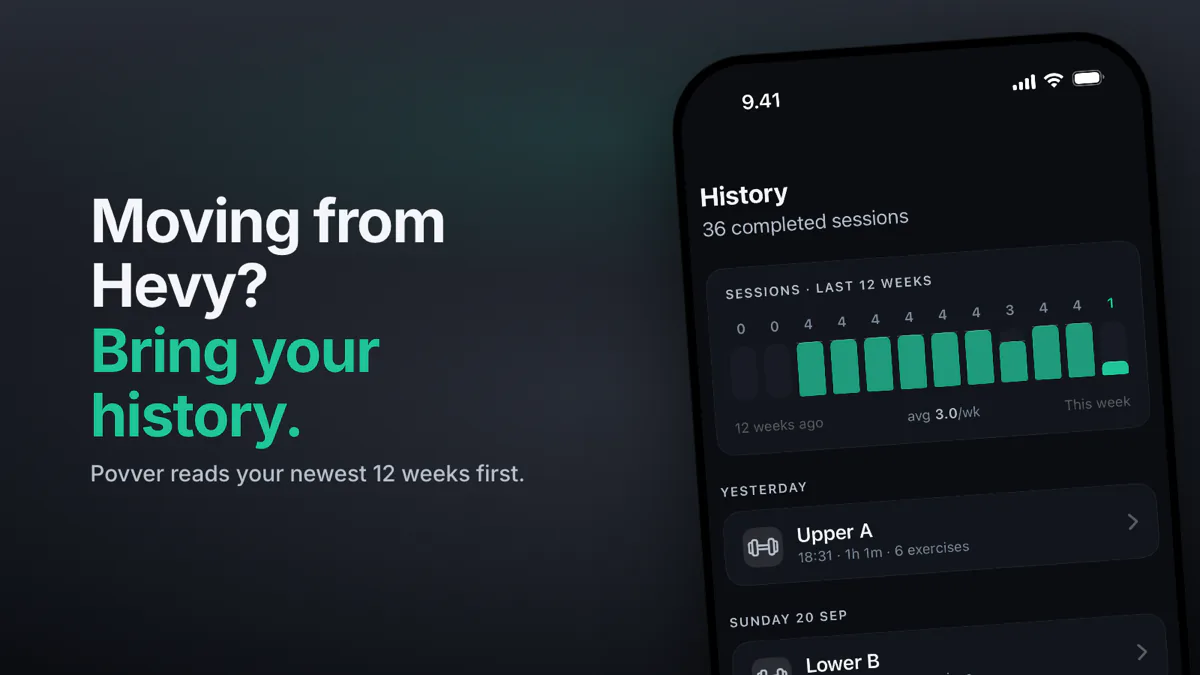
Hevy vs Povver: Hevy records your sets, and Povver acts on them. Every set you log changes your next workout. A strong session raises the weight, a miss or a layoff lowers it, and each suggestion carries its reason. Povver starts from your Hevy history and connects to Claude. We make Povver.
Progress in the gym shouldn't take a science degree or a spreadsheet. You log every set and still pick the next weight by feel, the way you did before you logged anything. Povver does that part for you.
Hevy or Povver: which should you use?
Pick Povver if you want the app to set your next weight and plan the week. Pick Hevy if you want a free logger, the Apple Watch, Android or friends in the app.
| You want | Pick |
|---|---|
| The app to set your next weight after every session | Povver |
| Weekly sets per muscle checked against a range, and deloads planned | Povver |
| To start from your Hevy history, not from zero | Povver |
| Claude to build, edit and review your training | Povver |
| A free logger, Apple Watch, Android or friends | Hevy |
How does Povver choose your next weight?
Povver sets your next weight and rep targets for every lift the moment you finish a workout, from the reps and the reps in reserve (RIR) of each set.
One strong session can raise a weight. A clear miss, or two very hard sessions at the same weight, brings it back down, and after three weeks or more off a lift the first session back starts lighter. The step is sized from how much you had in reserve, so an easy set moves a weight further than a grind does.
Each suggestion carries a short reason on its card. With auto-pilot on, small changes apply themselves and bigger ones wait for your tap. An AI model writes the coach chat and the explanations, but the progression weights come from fixed rules, described on how it works.
How does Povver handle weekly volume, deloads and injuries?
Povver checks weekly volume against a range, plans a deload week at the end of each block and stops pushing lifts that load an injured area.
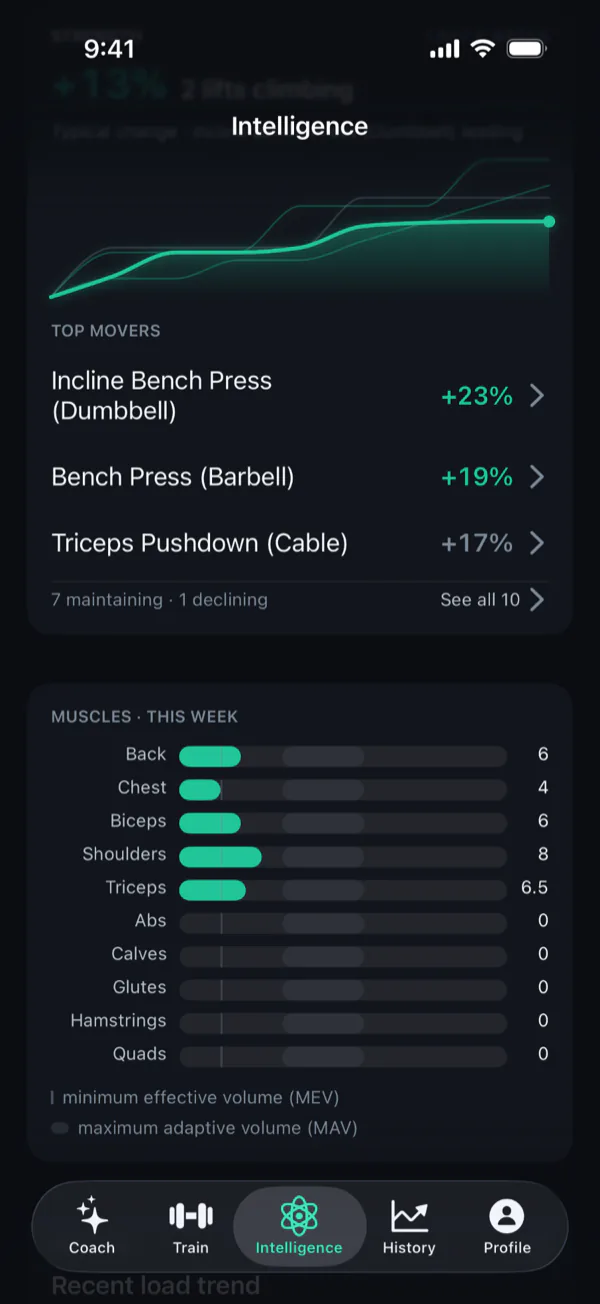
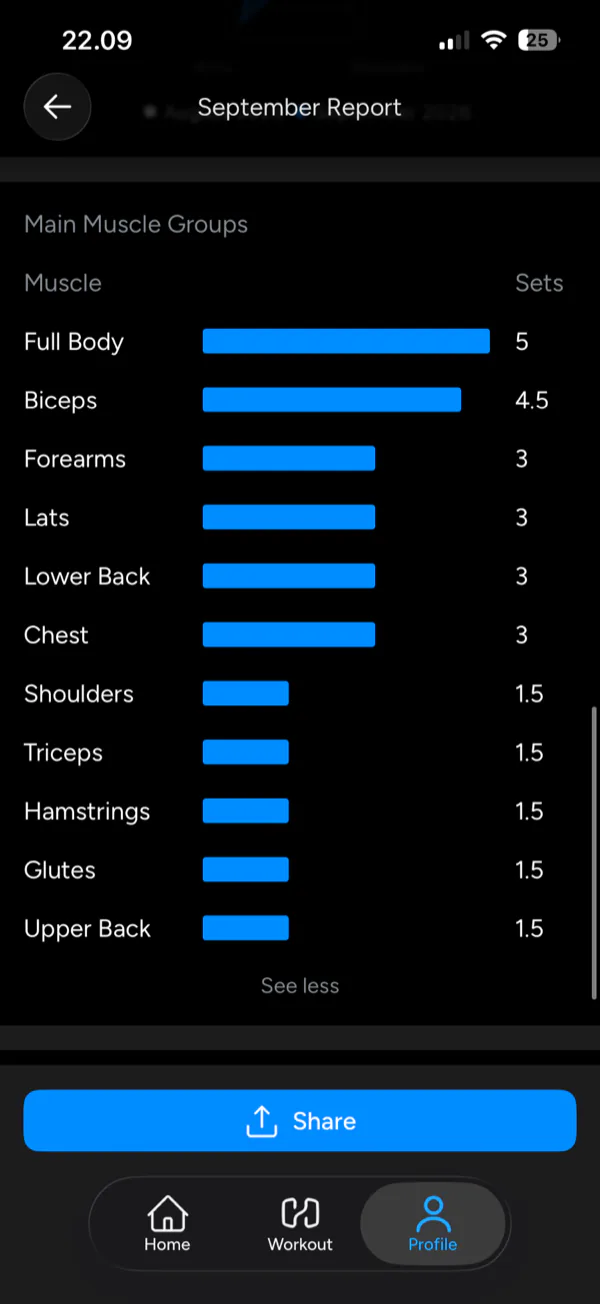
Volume. Povver counts the hard sets each muscle gets in a week, with a set that only helps a muscle counting as half, and checks the count against one range for every muscle. The Intelligence tab lays every muscle against that range, with counts like 7.5. A muscle that falls short or runs far past the range gets a flag and a proposed fix. Hevy counts sets per muscle too (Pro), and on a free account its reports showed halves such as 4.5 and 1.5. It does not put a range on the regular chart.
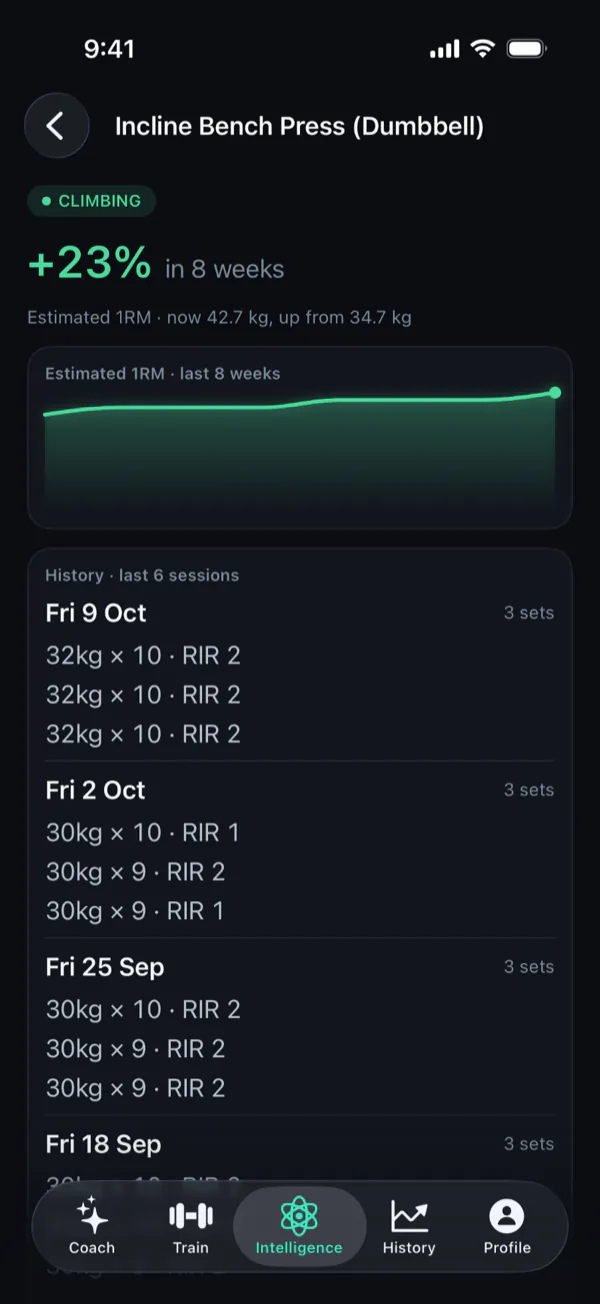
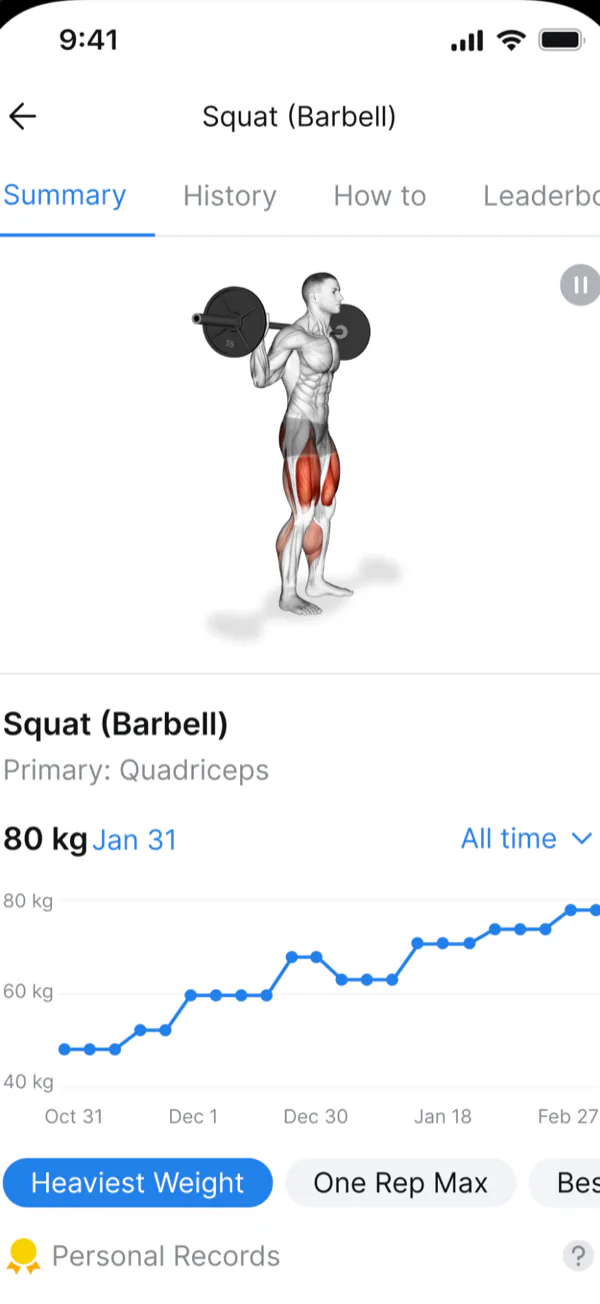
One lift over time. Both apps chart a lift. Povver's page opens on the verdict, climbing or stalled, with the estimated one-rep max and the last sessions with the reps in reserve you logged.
Deloads. Povver's block plans end with a deload week of about half the sets at lighter weights. If your training load climbs fast for two weeks, Povver can suggest a deload sooner.
Injuries. Tell the coach about an injury and Povver stops proposing heavier work on lifts that load that area, then brings the work back after pain-free sessions. In Hevy Trainer you add an injury yourself and the affected exercises are replaced or flagged.
What can you do with Claude in Povver?
Povver connects to Claude, so the assistant and the app work on one training log. Ask Claude for a routine or a one-off workout and it is created in Povver. Make the routine your active one, which Claude can do for you, and Povver progresses it from the sets you log. You can swap exercises as you go and bring the results back to Claude to review and adjust. Claude gets numbers Povver has already computed, each lift's trend, your weekly sets per muscle against the range, your strength climb and the open recommendations, not a wall of raw sets, and it can change your workouts, routines and training plan. Connect Claude to your workout log walks through it with an example.
Povver computes the numbers and Claude reasons over them:
| Layer | What it does |
|---|---|
| Claude | Picks what matters, explains it and suggests the next move |
| Povver | Computes each lift's trend, hard sets per muscle against the range and the recommendations. The same log gives the same answer |
| Your log | Every set you log, in any routine |
How Claude and Povver split the work.
A model reading Hevy's API gets the raw log and has to do that arithmetic itself. The difference in size is large. On one real account, about 45 sets a week, twelve weeks of raw set records come to roughly 540 sets:
| What Claude reads | Roughly, in tokens |
|---|---|
| Every set as a raw record | 60,000 |
| Povver's full weekly review and insights | 14,000 |
| Povver's strength climb, the answer to "am I getting stronger?" | 1,000 |
Estimated on 2026-10-15 from one account: about 110 tokens per raw set record and four characters per token. A rough guide, not a benchmark.
Less to read means faster answers, more room left in the conversation and lower usage.
Setup is a custom connector in Claude (mcp.povver.ai/mcp) or the Claude screen under Integrations in the app, and it works during the 14-day trial.
In Hevy, progression lives inside Hevy Trainer, and Hevy's team says that works on Trainer workouts, not on routines you built yourself. In Povver, your active routine is the one that gets progressed, even a routine Claude wrote for you.
What happens to your sets after you log them in Hevy?
Hevy keeps your history and shows what you lifted last time. The next weight stays your decision. Hevy Trainer, part of Hevy Pro, is Hevy's answer: it builds a program from a short questionnaire and raises a weight once you reach the top of the rep range with it on every prescribed set. Hevy says an algorithm writes the programs, not AI. Hevy also has a ChatGPT app that builds plans into your account, according to its site, and since September a button that sends a finished workout to ChatGPT or Claude. Hevy's public API needs Pro and returns raw workouts, routines and exercise history, and its docs list no trend or volume endpoints. Hevy says its ChatGPT app can analyze your progress and trends but does not say what data it uses.
Hevy's team says in posts on r/Hevy that Trainer works on Trainer workouts, not on routines you built yourself. It also says a program keeps the same exercises for a six-week block by default, and that switching split type starts a new program and loses your progress on the old one. Hevy's pages describe no deload, fatigue or layoff rule, and they do not state how Trainer lowers a weight.
How do Hevy and Povver compare side by side?
| Povver | Hevy | |
|---|---|---|
| Next weight | Set after every session from your reps and RIR, up and down | Up at top of rep range (Trainer, Pro). Decrease rule not stated |
| Weekly volume | Sets per muscle against a range, with fixes | Sets per muscle (Pro). Trainer's report shows a range |
| Deloads | Planned in each block | Not described |
| Injuries | Heavy work on that area stops | You add one, exercises are swapped or flagged |
| Your history | Reads a Hevy export and builds your first programme | Imports Strong CSV only |
| Claude and AI | Connect Claude: computed trends and volume, edits routines and plans | ChatGPT app. Pro API with raw logs |
| Supersets | Yes | Yes |
| Price, US | $9.99 a month or $69.99 a year. 14-day trial on monthly | Free. Pro $2.99 a month, $23.99 a year, $74.99 once |
| Price, DE and FI | 9,99 EUR a month, 79,99 EUR a year | Pro 3,49 EUR a month, 26,49 EUR a year, 89,99 EUR once |
| Runs on | iPhone, iOS 18.5 or later | iPhone, iPad, Android, Watch, Wear OS, web |
| Social | None | Feed, follows, leaderboards |
| Export | None in the app | Spreadsheet file |
Compared 2026-10-15. Prices are App Store prices that day and change by country. Hevy rows come from its help centre, App Store page, team posts and our own look at a free account.
Is Povver worth more than Hevy Pro?
Your first programme is built from your Hevy history before you pay, and with auto-pilot on, your week's weights move on their own. That is what Povver's $69.99 a year buys, against $23.99 for Hevy Pro on top of a logger that is free. Povver has no free tier, and new accounts get a 14-day trial on the monthly plan.
How do I move from Hevy to Povver?
Export your workouts from Hevy, give Povver the file, and your first programme is built from your own lifts.
- Export your workouts from Hevy. The path is Profile, Settings, Export & Import Data, Export Data.
- Give Povver the file during setup. It reads your newest 12 weeks first, then the rest in the background.
- Povver shows where each main lift stands and builds your first programme and first week's weights from your own lifts. How the import works has the detail.
Import the same file twice and Povver creates no duplicates. You can remove an import any time. Only your history comes across, not your routines. Moving back is harder: Hevy officially imports only Strong CSV files and Povver has no in-app export.
Who should stay on Hevy?
Stay on Hevy if you want it free, on Apple Watch or Android, or with friends in the app.
Hevy vs Povver: common questions
Why switch if Hevy already works? Logging tells you what you did. Povver uses it: it reads every set and your reps in reserve, sets the next weight and moves it up or down, checks weekly volume per muscle against a range, plans the deload and brings your Hevy history with it. If you still pick every weight by feel, that is the part Povver takes over.
Is Povver worth the price? Povver costs $9.99 a month or $69.99 a year in the US against $23.99 a year for Hevy Pro. Your first programme is built from your history before you pay.
Can I import my Hevy history into Povver? Yes. Povver reads a Hevy export and builds your first programme and weights from it.
Does Povver lower a weight? Yes. A clear miss, or two very hard sessions at the same weight, lowers it, and after three weeks or more off a lift the first session back starts lighter.
Does Hevy have progressive overload? Hevy Trainer, in Hevy Pro, raises a weight when you reach the top of the rep range on every prescribed set. Hevy's pages do not describe how it lowers a weight or plans a deload.
Can I use Claude with Povver? Yes. Connect Claude to Povver and it can build routines and workouts, read your log and volume, and change your plan. Make a routine your active one and Povver progresses it from the sets you log.
Does Povver have a free plan? No. New accounts get a 14-day free trial on the monthly plan, then pay $9.99 a month or $69.99 a year in the US.
Does Povver work with Apple Watch or Android? No. Povver is an iPhone app and needs iOS 18.5 or later.
Sources
- Hevy Help Centre, "Hevy Trainer Explained: How It Builds Your Workout Program". help.hevyapp.com/hc/en-us/articles/38385724273047-Hevy-Trainer-Explained-How-It-Builds-Your-Workout-Program
- Hevy Help Centre, "Hevy Pro Subscription: How to get Pro and What Does It Include". help.hevyapp.com/hc/en-us/articles/35119778922263-Hevy-Pro-Subscription-How-to-get-Pro-and-What-Does-It-Include
- Hevy Help Centre, "Importing Strong Data into Hevy". help.hevyapp.com/hc/en-us/articles/35687878672663-Importing-Strong-Data-into-Hevy
- Hevy Help Centre, "Exporting Your Data from Hevy". help.hevyapp.com/hc/en-us/articles/43708290987415-Exporting-Your-Data-from-Hevy
- Hevy team posts on r/Hevy, "Trainer update: control your program variety + tell Trainer about injuries" and "Trainer update: more split options". www.reddit.com/r/Hevy/comments/1vkg5fr/
- Hevy on the App Store, in-app purchase prices, read 2026-10-15. apps.apple.com/us/app/hevy-workout-tracker-gym-log/id1458862350
- Povver on the App Store, in-app purchase prices, read 2026-10-15. apps.apple.com/us/app/id6759248585
