To connect ChatGPT to a workout log, add the app's MCP server as a custom connector. For Povver, a strength training app, open Plugins in ChatGPT, click Add, choose Add custom MCP server, enter https://mcp.povver.ai/mcp, pick OAuth and sign in with your Povver account. It worked on a free ChatGPT account. Povver's server lets ChatGPT read your sets, trends and volume and change your routines and plan. You need the iPhone app and a trial or subscription (pricing), and the 14-day trial includes it.
How do I connect ChatGPT to my workout log?
- Install Povver on your iPhone, create an account and start the 14-day free trial.
- Log your sessions in the app. ChatGPT answers from what is logged, so a few weeks of history give it trends to read.
- In ChatGPT on the web, open Plugins, click Add and choose Add custom MCP server. You can't add a custom connector from ChatGPT's phone app, so do this step on a computer.
- Name it Povver and paste the server URL:
https://mcp.povver.ai/mcp - Set Authentication to OAuth, tick "I understand and want to continue" and create the server.
- Sign in with your Povver account on the page that opens, then click Allow access.
- Ask a question about your training. ChatGPT calls Povver when it needs your log, and you can name it at the start of a message, as in the screenshot below.

Povver's sign-in page asks "Allow ChatGPT to access your Povver data?" and says ChatGPT will be able to read and modify your routines, templates and workout data. Each time ChatGPT reads or writes, Povver checks that your trial or subscription is still active.
What if my ChatGPT shows Developer mode instead of Plugins?
Open Settings → Connectors → Advanced settings, switch on Developer mode, click Create and fill in a name, the MCP server URL and OAuth. That is the path in Auth0's and Customer.io's guides, which say you need a ChatGPT Plus or Pro account (Customer.io also lists Enterprise). ChatGPT renames its menus often, so other guides don't always match. The URL and the sign-in are the same, so follow whichever menu you see.
What does ChatGPT say when it reads my training?
The log in these two examples is a demo account on an upper/lower split, the same one as in the Claude example. Both screens are ChatGPT on a free plan.
"List my last five workouts."

ChatGPT listed the workouts newest first: Upper A on 16 October (71 minutes, 19 working sets), Lower B on 15 October (75 minutes, 18 sets) and Upper B on 13 October (61 minutes, 18 sets), each with its exercises and total volume. It's the fastest way to check the connection works.
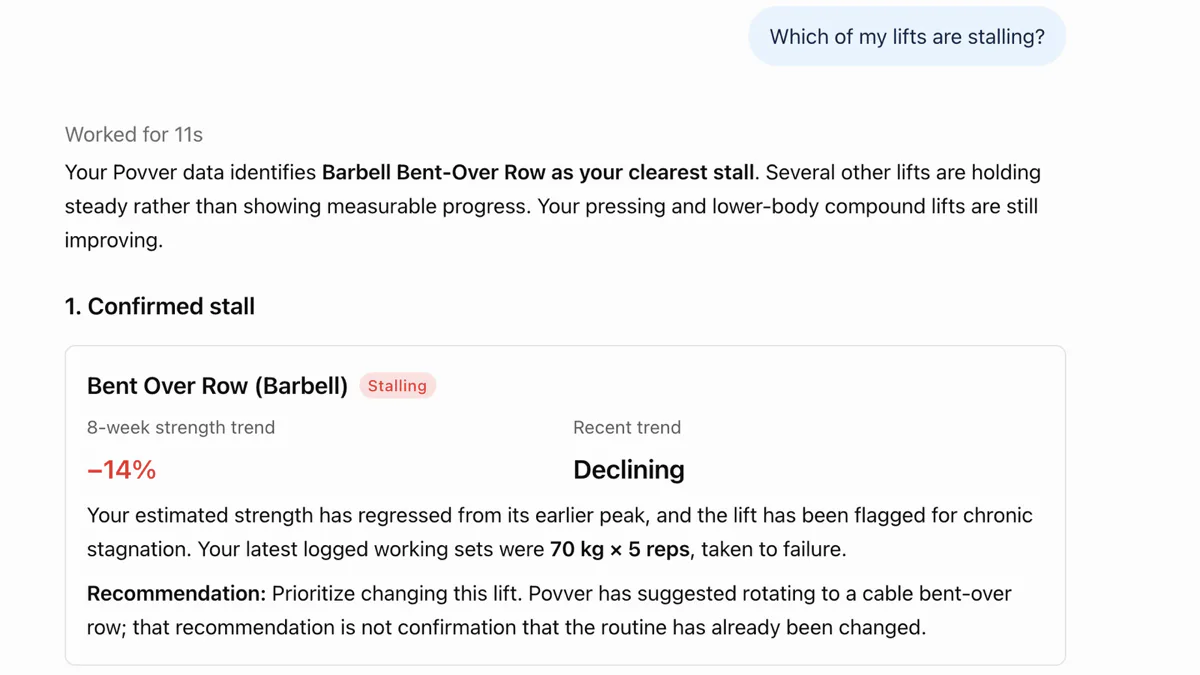
"Which of my lifts are stalling?"

"Your Povver data identifies Barbell Bent-Over Row as your clearest stall," ChatGPT answered. It showed the row down 14% over 8 weeks and still falling, plus the last working sets: 70 kg / 154 lb for 5 reps, taken to failure. It listed the overhead press, lat pulldown and seated row as holding, and said the pressing and lower-body compound lifts are still improving.
Povver had also suggested rotating to a cable bent-over row, and ChatGPT pointed out that this recommendation does not mean the routine has changed. To act on it, ask ChatGPT to change the routine, the way the Claude example swaps the row for a chest-supported row in both upper-body templates.
What should I ask ChatGPT about my training?
Start with the question you would ask a coach:
- Which of my lifts are stalling, and what does the log say about why?
- Am I doing enough hard sets for my back and chest each week?
- List my last five workouts and how many working sets each had.
- Swap the barbell row for a chest-supported row in both upper-body templates.
- My shoulder is sore. Rework next week so I'm not pressing through it.
- Plan a deload week from what I actually did.
You don't need to name Povver in the question: ChatGPT uses it when a question needs your log.
Why does Povver work out the numbers before ChatGPT reads them?
If you give a model your raw sets, it has to do the maths before it can tell you anything, and twelve weeks of sets from one real account come to about 60,000 tokens. Povver works out each lift's trend and weekly hard sets per muscle first, so the strength climb that answers "am I getting stronger?" is about 1,000 tokens. The numbers are the same every time, and ChatGPT only has to read them and say what to change. The Claude page has the token counts, the prices and a test across three Claude models.
What can ChatGPT read and change in Povver?
ChatGPT can read every set you've logged, whether each lift is progressing, holding or stalling, estimated 1RM by week, and hard sets per muscle compared with your target range. It can write routines, templates, your training plan and finished workouts, remember an injury, and act on a workout in progress. A workout starts in the Povver app. The full list is at mcp.povver.ai. The same server works in Claude and Gemini.
What if ChatGPT doesn't use Povver or shows an error?
Name Povver in the message, as in the screenshot above, and ChatGPT will use it. If the answer says your session expired, add the server again under Plugins and sign in. If it says Povver Premium is required, your trial or subscription has ended, and you can renew it in the Povver app.
Last reviewed 18 October 2026. Cite as: Povver, "Connect ChatGPT to your workout log: setup and a real example", povver.ai/blog/chatgpt-training-log, 2026.
Connecting ChatGPT to a workout log: common questions
How do I connect ChatGPT to my workout log?
Add your logging app's MCP server in ChatGPT. For Povver, open Plugins, click Add and choose Add custom MCP server, enter https://mcp.povver.ai/mcp, set Authentication to OAuth and sign in with your Povver account. ChatGPT can then read your sets, trends and volume and change your routines and plan.
Does Povver work with ChatGPT on a free plan?
Yes. On a free ChatGPT account with a demo log, Povver's server connected, listed the last five workouts and named the barbell row as the stalling lift. Some guides say you need Plus or Pro, and ChatGPT's menus and plan limits change.
What is Povver's MCP server URL for ChatGPT?
https://mcp.povver.ai/mcp. Choose OAuth as the authentication and sign in with your Povver account. No API key is needed.
Can ChatGPT change my Povver workouts and routines?
Yes. Through Povver's server ChatGPT can write routines, templates, your training plan and finished workouts, and log sets or finish a workout you started in the app. One tool deletes, and it is marked destructive.
Do I need the top ChatGPT model to read my training log?
Povver works out the trends before ChatGPT sees them, so the model only has to read them and explain what to change. In one test on Claude, Haiku, Sonnet and Opus gave the same answer, and the Claude page has the numbers.
Can I add Povver from the ChatGPT phone app?
Not from the phone app: ChatGPT doesn't let you add a custom connector there, so set Povver up on a computer.
What is MCP?
MCP, the Model Context Protocol, is an open standard that lets an AI assistant read and change data in another app. The app runs a server, and assistants such as ChatGPT connect to it by URL. Povver does not use your workout data to train AI models.
Does connecting ChatGPT cost extra?
No extra cost beyond Povver. The connector needs a Povver trial or subscription, checked on every request, and the 14-day free trial includes it. OpenAI decides which ChatGPT plans can add a custom MCP server.
Sources
- Model Context Protocol, specification. modelcontextprotocol.io/specification
- Povver docs, Connect Claude and other assistants. povver.ai/docs#claude
- Auth0, Integrate your Auth0 secured remote MCP server in ChatGPT Developer Mode. auth0.com/blog/add-remote-mcp-server-chatgpt/
- Customer.io, ChatGPT setup (MCP). docs.customer.io/ai/mcp/chatgpt/
